 Zhi Sang
My roleIndependent extension development, interaction design and release preparation
Stagev0.3.0 published; real-site compatibility validation continues
Tools & methodsJavaScript / Chrome Extension / Manifest V3 / Side Panel
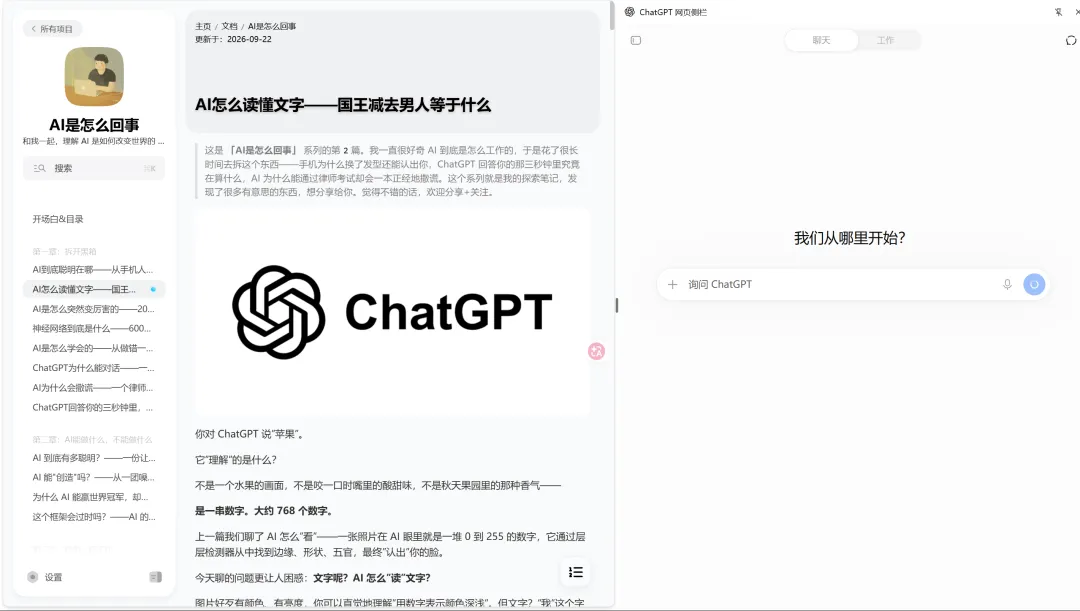
A conversation beside the page I am reading
I developed this extension to put the original ChatGPT website in Chrome’s native side panel. While reading a page, I can keep the source visible, discuss it using my own ChatGPT account, and pass its URL or selected text into the conversation when needed.
The extension handles the panel, content transfer and restoration; the ChatGPT website provides the responses. It uses Manifest V3, JavaScript, HTML and CSS, with Chrome’s Side Panel API.
From a web page to a draft
I separated continuing a conversation, adding context and explicitly starting a new chat:
| Action | Behavior |
|---|---|
Extension icon or Ctrl+G | Open or close the panel and continue the existing conversation |
Alt+G | Open the panel and append the current page URL to the composer |
| Select text and click “问问 ChatGPT” | Append the page URL and selected text to the composer |
Ctrl+Shift+G | Start a new conversation and clear the panel draft |
Transferred content becomes a draft for me to review and send. Opening and closing the panel retains the current conversation; a new chat requires an explicit action. Shortcuts can be changed in Chrome’s settings.
Restoring a conversation and draft
I use chrome.storage.session to save the conversation URL and text draft for each window. Reopening the panel restores these two items so that work can continue after briefly closing it. Exiting Chrome or reloading the extension clears this session cache. Sent conversations remain with the ChatGPT account.
A temporary queue passes pending page content to the embedded page. Items are removed after insertion and have an expiration time. Content scripts detect selections; the selection button uses Shadow DOM and Popover to separate its presentation from page styles. An origin-checked message channel carries content and restoration state into the embedded page.
Embedding, permissions and compatibility
To embed ChatGPT, the extension removes X-Frame-Options and the entire Content-Security-Policy header from ChatGPT subframe responses initiated by this extension. This reduces browser-side protections for that embedded page, within the scope of those requests. The repository README documents the permissions and risks.
Access to regular web pages supports selection detection and the selection button. Selected text and the URL are transferred when the button is clicked. Whether ChatGPT can retrieve a linked page also depends on that page’s access requirements.
Development and release
I implemented panel interactions, URL and selection transfer, session restoration, shortcuts, packaging and release preparation. Validation includes unit tests, browser checks against mock pages and GitHub build checks. Selection and restoration on real websites continue to be tested through use, and changes to the ChatGPT website may affect compatibility.
The repository provides bilingual documentation, source code and a v0.3.0 release package for installation through Chrome’s “Load unpacked” option. This is an independent third-party extension. Its code is MIT-licensed; the ChatGPT service, name and marks belong to their respective rights holders.