 Zhi Sang
My roleOpen-source adaptation, compatibility debugging and deployment documentation
StagePublicly available, in ongoing use and development
Tools & methodsTypeScript / React / WebSocket / Connect RPC / PWA
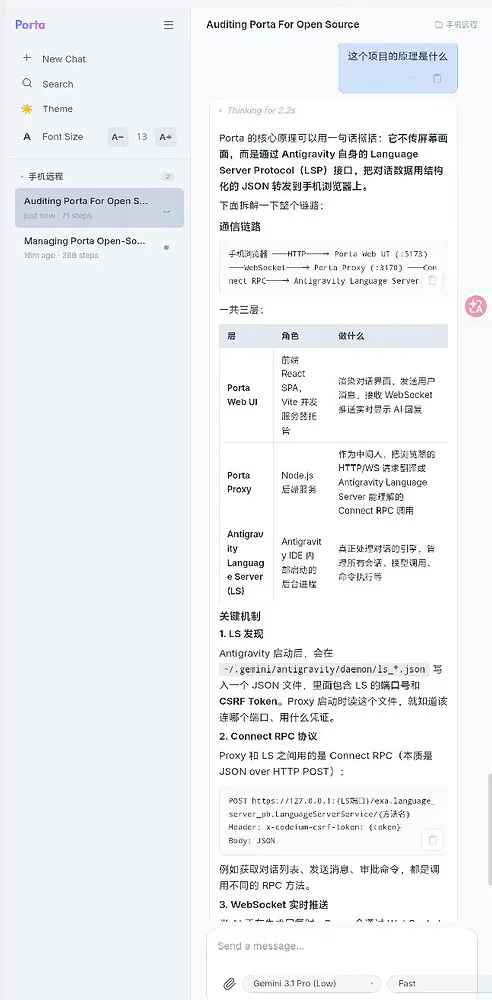
Why I wanted a phone interface
Sometimes I am away from my computer but still want to see how an Antigravity task is progressing or send the next instruction. Operating a desktop editor through a phone-sized remote desktop makes its text and controls awkward to use. I wanted to continue the conversation as I would in a mobile AI chat application.
I found the open-source project Porta ↗ and used AI-assisted development and debugging to adapt it into Porta Mobile. It provides a remote conversation interface: I can read responses, send messages, change models and handle command approvals on my phone, while Antigravity on the computer executes the tasks.
Connecting to the local conversation
The connection consists of a phone web interface, a local proxy and the Antigravity Language Server. The proxy calls the language server through Connect RPC; the React and TypeScript frontend uses HTTP and WebSocket to retrieve conversations and receive updates.
This exchanges structured conversation data instead of transmitting a desktop screen. Antigravity and the proxy must remain running on the computer. The phone connects over a local network, or through a virtual network when away from home. I use ZeroTier for my own setup.
The interface supports Progressive Web App installation. The repository explains how to add it to a phone’s home screen and configure remote access.
My changes
Keeping replies and actions in sync
I improved WebSocket updates so that Agent responses appear continuously, corrected the RPC field mapping for command approval and rejection, and synchronized conversations created on the phone back to the IDE.
I also fixed the display of images uploaded from the IDE, using a proxy file endpoint to load them on the phone. This complements the existing ability to upload an image from the mobile interface.
Chinese text, font sizes and mobile input
I corrected URI-encoded Chinese workspace names in the sidebar and added adjustable font sizes, later switching the scaling approach to rem units.
Mobile layout also has to account for the software keyboard, gesture navigation and safe areas. I adjusted dynamic viewport height and the input region to address a clipped composer when the keyboard opened. Stable model sorting and manual refresh controls made common actions easier to locate.
Version compatibility and multiple instances
For Antigravity 2.0, I handled the source field required when creating a conversation, added a selector for multiple IDE instances, and continued debugging my changes after merging upstream updates.
I also prepared Windows background-start scripts, Chinese and English READMEs, and AI-oriented deployment guides to document installation, networking and daily startup.
Developing through everyday use
I published the motivation, features and screenshots in a LINUX DO project post ↗. The interface image on this page comes from that post and shows the sidebar, font controls, conversation and composer.
Porta provides the underlying bridge and web interface. Porta Mobile retains its MIT license and attribution. My work focuses on synchronization, compatibility, images and mobile issues encountered in use, along with deployment documentation. The source and setup guides are available in the repository below.